If you're managing a large Milestone XProtect deployment, you already know the routine: camera checks, storage reports, compliance audits, and...
When we built The Boring Toolbox, our goal was simple: help Milestone XProtect administrators spend less time worrying about whether their video system was working and more time getting on with their day.
Over the years, that mission has grown into health dashboards, reporting, storage monitoring, analytics, bulk management tools, password management, and everything else you need to keep an XProtect system healthy.
For years, The Boring Toolbox has helped answer questions like:
Today, we’re adding a new question to that list:
Is the video actually usable?
Because a camera can be online, recording perfectly, and still be producing blurry, obstructed, or unusable footage.
Until now, those problems were usually discovered one of two ways: during a manual spot check or after an incident, when someone finally opened the footage and realized it was too late.
That’s why we’re excited to introduce AI Image Analysis, the newest video image health monitoring capability in The Boring Toolbox.
Video image health monitoring is the practice of verifying that cameras are producing usable video, not just that they’re online and recording.
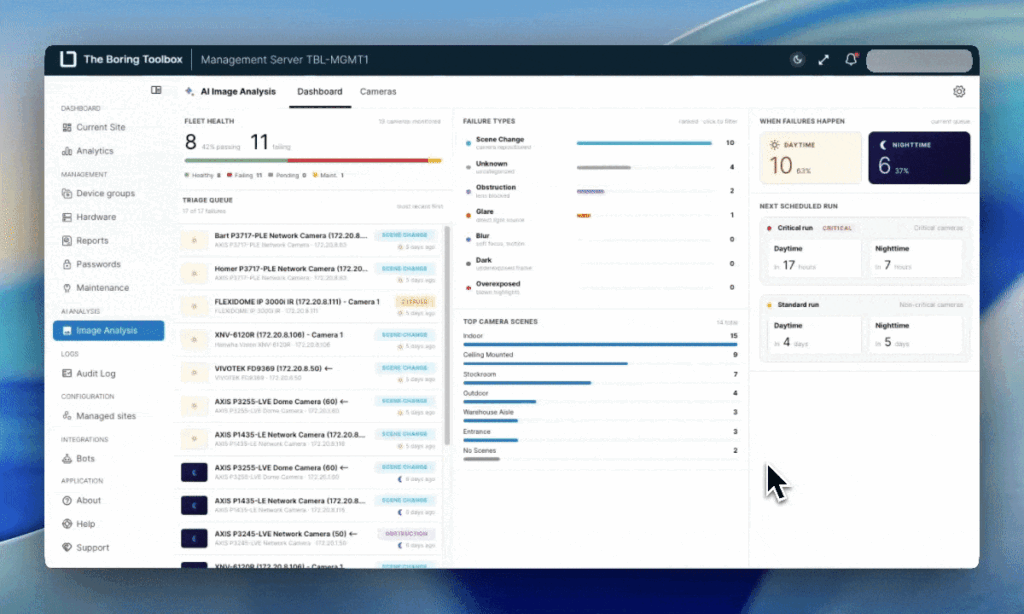
AI Image Analysis brings video image health monitoring to The Boring Toolbox for Milestone XProtect by automatically checking camera images for blur, glare, darkness, obstruction, overexposure, and scene changes.
Traditional health monitoring tells you whether a camera is connected.
AI Image Analysis tells you whether the image coming from that camera is still doing its job.
It automatically checks every camera against a saved reference image and looks for common image quality problems, including:
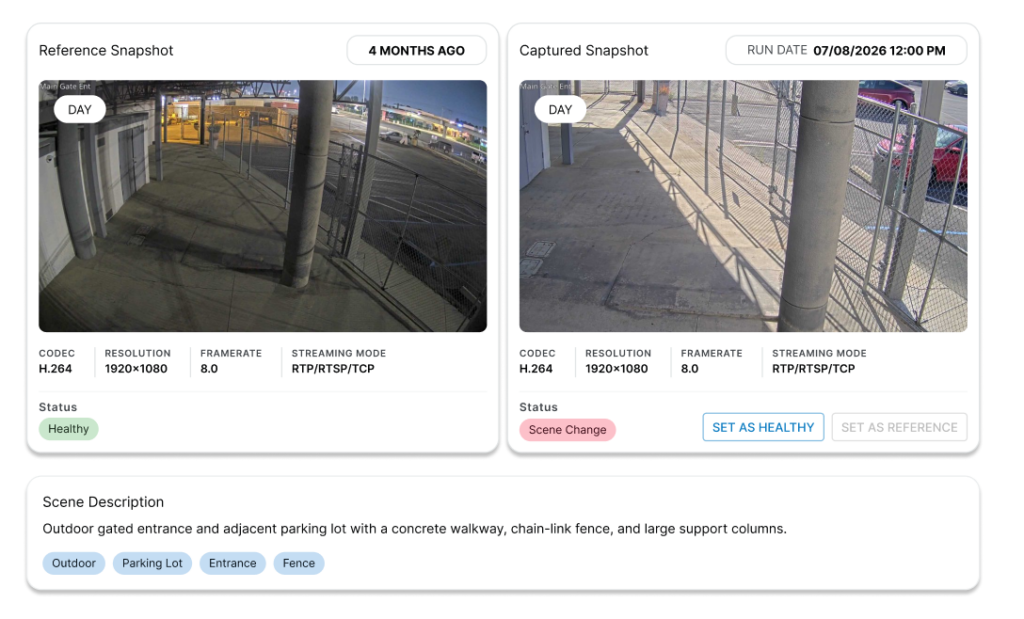
If something changes, you’ll receive an alert. The Boring Toolbox will have the complete details and history of captured images compared to the set reference image. Everything you need to start troubleshooting quickly and efficiently.
Because sometimes the problem isn’t that the camera stopped recording.
It’s that nobody noticed the tree grew into the frame, maintenance bumped the camera toward the ceiling, or a dirty lens slowly turned useful evidence into a blurry mess.
Getting started with AI image analysis is quick and easy.
Once you have The Boring Toolbox installed* you can turn on AI Image Analysis with the click of a button.
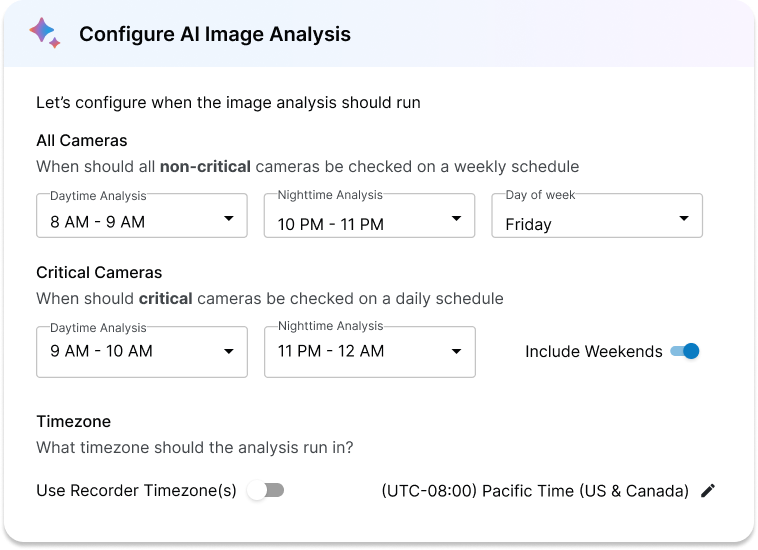
Simply hit “enable” and set the time for when you want the daytime and night time checks to run.
During the first run, the system will automatically capture your baseline image for each camera view. That image is what will be used as a reference image to compare all future images to.
Don’t like the saved reference image? Hit the button to re-run it.
*AI Image Analysis requires The Boring Users IAM to be enabled.
Standard cameras get checked weekly (day and night).
Critical cameras (tagged in your hardware configuration) get checked daily (day and night).
Any cameras tagged as “sensitive” are automatically skipped.
If a camera’s image quality has degraded, you’ll see exactly what’s wrong. The system tells you the category (blur, glare, scene change, etc.) and gives you a full history with screenshots of all past runs so you can see exactly what went wrong and when.
Your data privacy is always top of mind for us!
Images are processed in the cloud, then stored locally on your own local recording server. Only the metadata, the result, not the image itself, is stored in the cloud, and none of it trains an AI model.
Cameras that need an extra privacy can opt out of analysis entirely when they are marked as “sensitive”. You can do this in bulk, in seconds, the same way you mark cameras as “critical.”
The goal of The Boring Toolbox is to help you get the most out of your Milestone XProtect VMS.
AI Image Analysis builds on the health monitoring capabilities you already rely on by adding visibility into something we’ve never been able to monitor before: the quality of the video itself.
Because healthy cameras don’t always produce healthy video.
Now you can know the difference before someone needs the footage.
AI Image Analysis is available now as an add-on feature in The Boring Toolbox for Milestone XProtect.
Start your free 15-day trial today and see how AI Image Analysis, along with reporting, analytics, bulk management, and system health monitoring, can help you spend less time wondering whether your video will be there when you need it and more time knowing it will.
Already a Boring Toolbox user? You get a free trial too!
Enroll directly from the new AI Image Analysis option in your sidebar menu!

If you're managing a large Milestone XProtect deployment, you already know the routine: camera checks, storage reports, compliance audits, and...

The Boring Lab’s Camera Hat campaign has been shortlisted for the Drum Marketing Awards Americas 2026 in the B2B category....

Most Milestone administrators assume that if they set retention to 30 days, they have 30 days. That's not always true....